
 By
By 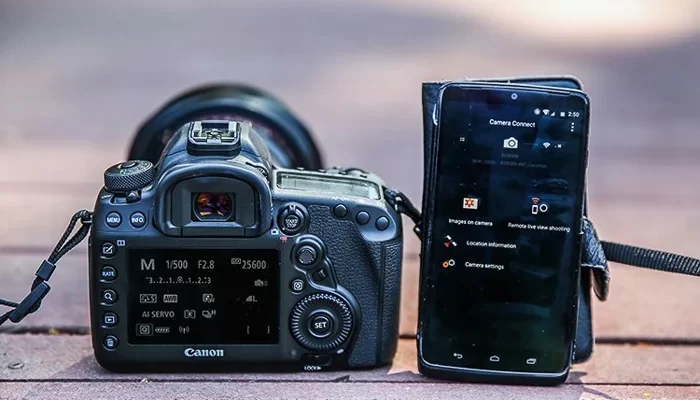
No matter what kind of photographer you are, at some point you may have been required to shoot remotely. With the rise of smartphones, you don’t need to buy a tethering cable or remote if you have your smartphone. With apps like Canon Camera Connect, you can turn your smartphone into a handy camera remote. The application allows you to operate compatible Canon cameras on your smartphone/tablet – you just need to connect the camera and smartphone over WiFi.
Canon Camera Connect Features
Wireless Control
This can be termed as the main benefit – with the app, you can adjust all the same settings that are on your camera. All from your smartphone’s screen. The settings include shutter speed, aperture, ISO, white balance, and focus mode. You can choose to shoot in JPEG, RAW or JPEG + RAW just like on your camera.
Image Transfer
The app can transfer images you have shot on your device which also allows you to post images in real-time. There are lots of apps to edit images on your phone. If you are always on the go or want to stand out from the social media crowd, being able to transfer images to your phone and edit them can be a big thing for your client.
GPS Addition
If you want to remember where you took an image or video from, you can add accurate GPS data to your footage via the Canon Camera Connect App. You can set the app to record the information even while your device is not connected. Then you can transfer the data later on when it’s connected to WiFi.
How To Use The Canon Camera Connect App
- Download and install the Camera Connect app from the App Store or Play Store.
- Turn on your camera and click on the Menu button.
- Navigate to the configuration menu and select Wi-Fi.
- Select Enable.
- Select OK.
- Enter a nickname for the camera and select OK.
- Select the Wi-Fi function.
- Select Connect to smartphone.
- Select Easy connection.
- Open the Wi-Fi settings on the other device, locate the camera’s Wi-Fi connection, and connect to it. (The Wi-Fi network password is on the camera)
- Open the Camera Connect app on the device and select the Canon camera to complete the connection process.
- When the connection is successful, the LCD on the camera turns off, and the app displays the viewfinder.


I don’t think the title of your article matches the content lol. Just kidding, mainly because I had some doubts after reading the article. https://www.binance.com/register?ref=MBLCVVZG